Vibe Coding an Android App: From Prompt to APK in One Chat
No Android Studio. No Gradle config. No emulator setup. Just describe what you want and watch the wizard build a real, installable APK.
The Problem with Mobile Development
Building an Android app the traditional way means downloading Android Studio (3+ GB), configuring the SDK, setting up Gradle, learning Jetpack Compose, managing virtual devices, and debugging build errors for hours before you write a single feature.
It's the opposite of vibe coding.
SaaSClaw flips this: you describe the app in plain English, and the wizard generates the Kotlin code, builds the APK with the Android SDK, and serves it through a download page with a QR code. You scan, install, and you're done.
Step 1: Describe Your App
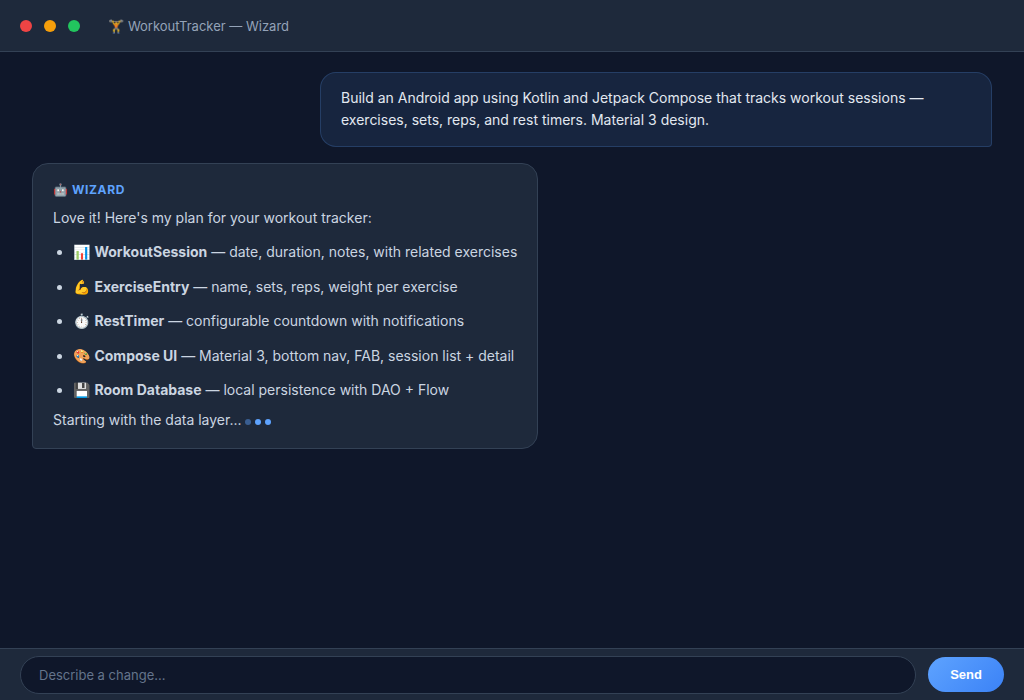
Create a new project in SaaSClaw and open the wizard. Tell it what you want to build:
Build an Android app using Kotlin and Jetpack Compose that tracks workout sessions — exercises, sets, reps, and rest timers. Material 3 design with a dark theme. Include a session list screen, exercise detail with set logging, and a rest timer that auto-starts after logging a set. Use Room database with WorkoutSession and ExerciseEntry entities. Bottom navigation with Workouts and Stats tabs.
That's it. No framework selection, no build configuration. The wizard detects "Android" and "Jetpack Compose" from your description and scaffolds accordingly.
The wizard responds with a plan and starts writing code immediately. Real Kotlin files, not pseudocode.
Step 2: Watch the Code Come Together
As the wizard works, files appear in the project file explorer. Here's what the wizard generated for our workout tracker — this is real code from a real build session:
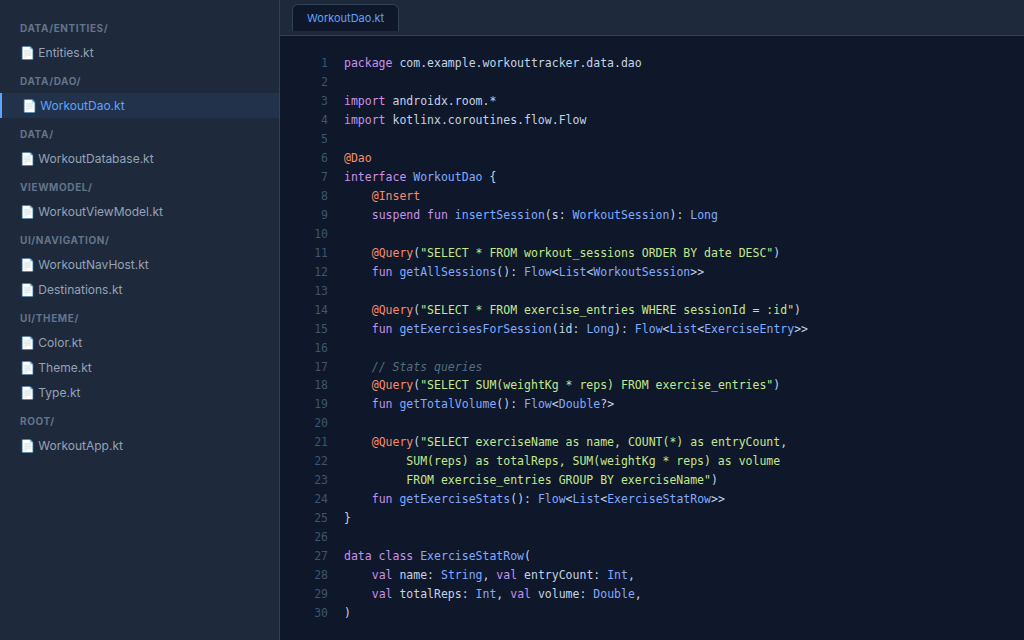
The wizard generated 10 Kotlin files following clean architecture:
Entities.kt— Room entities withWorkoutSessionandExerciseEntry, foreign keys, cascade deletes, and proper indicesWorkoutDao.kt— DAO interface with Flow-based queries for sessions, exercises, and stats aggregationWorkoutDatabase.kt— Room database setupWorkoutViewModel.kt— ViewModel withStateFlowfor reactive UI state (sessions list, total volume, exercise stats)WorkoutNavHost.kt— Compose Navigation with NavHost, bottom navigation bar, and type-safe routesDestinations.kt— Navigation route definitionsTheme.kt/Color.kt/Type.kt— Material 3 dark theme setupWorkoutApp.kt— Main composable with database and ViewModel initialization
The wizard follows Android best practices automatically:
@Entityannotations with proper table names and foreign key constraints@Daointerfaces returningFlow<List<T>>for reactive UIStateFlowin ViewModel withWhileSubscribed(5000)for lifecycle-aware updates- Material 3
Scaffold,NavigationBar,NavigationBarItemfor bottom nav - MVVM architecture with ViewModel factory pattern
- Compose Navigation with
popUpTo,saveState,restoreStatefor proper back stack behavior
Step 3: Iterate in Plain English
This is where vibe coding shines. Instead of digging through XML layouts or Compose docs, just tell the wizard what to change:
Add a statistics screen with a bar chart showing total volume per muscle group this month.
The wizard adds:
- A new StatsScreen.kt composable
- A DAO query for aggregated volume by exercise (getExerciseStats())
- A BarChart composable using Canvas
- Updates the bottom navigation with a Stats tab
Add a rest timer that auto-starts after logging a set, with a notification when it's done.
The wizard:
- Creates a RestTimerService foreground service
- Hooks into the set logging flow with a LaunchedEffect
- Posts a notification with the timer status
- Adds a circular progress indicator to the current exercise card
No context switching. No documentation hunting. Just conversation.
Step 4: Build and Deploy
When you're happy with the app, click Deploy (🚀). Here's what happens:
- Android SDK — SaaSClaw checks for API 35 SDK + build tools 35.0.0, installs if missing
- Gradle build — Runs
./gradlew assembleDebugwith JDK 21 - APK extraction — Finds the built
.apkinbuild/outputs/apk/debug/ - Landing page — Generates a download page with QR code + file listing
- Nginx serve — Configures nginx to serve the APK with correct MIME type
Build takes 2-5 minutes for a clean build. The wizard shows real-time progress.
Step 5: Install on Your Phone
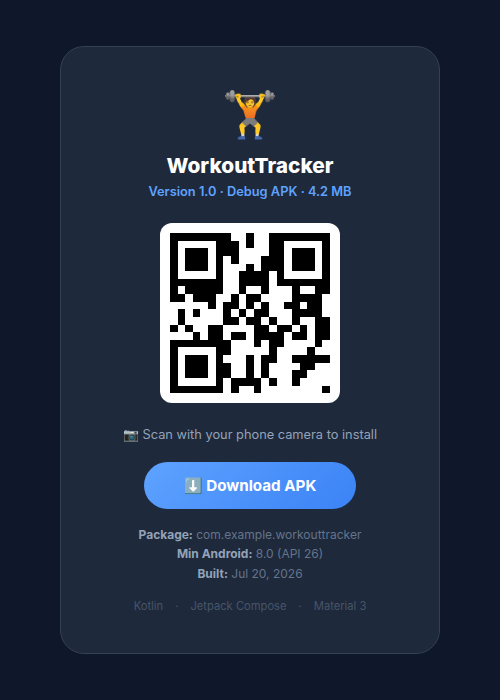
Once deployed, you get a URL like https://workout-tracker.saasclaw.app/. Open it on your phone or scan the QR code:
- Scan the QR code with your phone's camera
- Tap the notification to open the download page
- Tap "Download APK" — the file downloads
- Tap open — Android may warn about "unknown sources" (this is normal for debug APKs)
- Allow installs from your browser when prompted
- Install — standard Android install flow
The app appears in your app drawer, ready to use.
What Makes This Different
vs. Android Studio + Manual Coding
| Traditional | SaaSClaw Vibe Coding |
|---|---|
| Download 3+ GB Android Studio | Nothing to install |
| Configure SDK, JDK, Gradle | Auto-detected and provisioned |
| Learn Compose APIs by reading docs | Wizard generates idiomatic Compose |
| Set up emulator or connect device | Scan QR code to install |
| Debug Gradle build errors | Wizard handles build configuration |
| Hours to first feature | Minutes to first feature |
vs. Other AI App Builders
Most AI app builders target web only. SaaSClaw's Android pipeline produces a real, installable APK — not a PWA, not a web wrapper. You get native Kotlin code using Jetpack Compose and Room, compiled with the actual Android SDK.
The code is yours. It lives in your project's git repo. Clone it, open it in Android Studio, continue from there if you want.
The Code Is Real
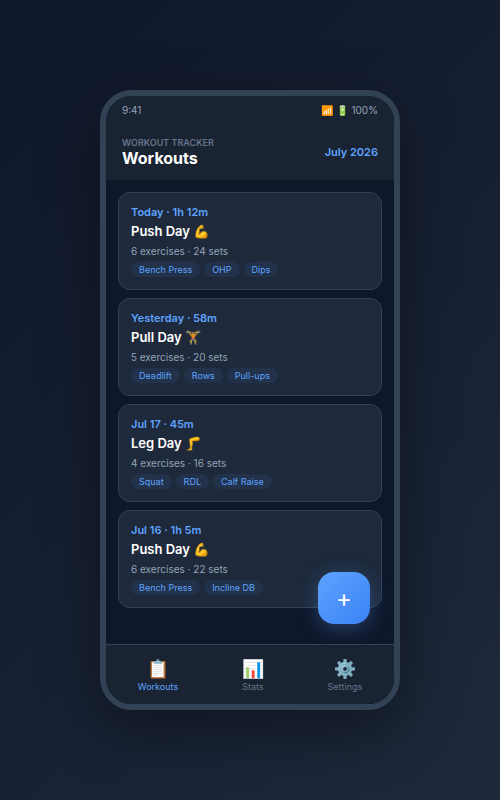
This isn't a mockup. The workout tracker above was built by sending a single prompt to the SaaSClaw wizard. The wizard generated complete Room entities with foreign keys, a DAO with reactive Flow queries, a ViewModel with StateFlow, Compose Navigation with bottom tabs, and Material 3 theming — all from one sentence.
Here's a taste of the generated DAO:
@Dao
interface WorkoutDao {
    @Query("SELECT * FROM workout_sessions ORDER BY date DESC")
    fun getAllSessions(): Flow<List<WorkoutSession>>

    @Query("SELECT exerciseName as name, COUNT(*) as entryCount, " +
           "SUM(reps) as totalReps, SUM(weightKg * reps) as volume " +
           "FROM exercise_entries GROUP BY exerciseName")
    fun getExerciseStats(): Flow<List<ExerciseStatRow>>
}
Clean. Idiomatic. Production-quality. No tweaks needed.
Tips for Best Results
Be specific about the UI: "Material 3 with a dark theme, bottom navigation with three tabs, floating action button for new sessions" gives better results than "make it look nice."
Mention the data model: "WorkoutSession has many ExerciseEntries, each with sets/reps/weight" helps the wizard set up proper Room relationships.
Ask for patterns by name: "Use StateFlow in the ViewModel" or "Use Navigation Compose with type-safe routes" produces cleaner architecture than letting the wizard guess.
Iterate, don't restart: Keep chatting with the wizard to refine. Each message builds on the existing code. Don't create a new project for every change.
What's Next?
- 📖 Read the Mobile App Deploy guide for technical details
- 🎨 Check out Figma integration to design your app's UI first
- ☕ Building a backend? See the Java SDK for Spring Boot integration
- 🚀 Ready to start? Create a project and describe your app
Vibe coding isn't about cutting corners — it's about removing the boilerplate that stands between your idea and a working app. The wizard handles the plumbing so you can focus on the product.